Google Search Console, next to your visitors
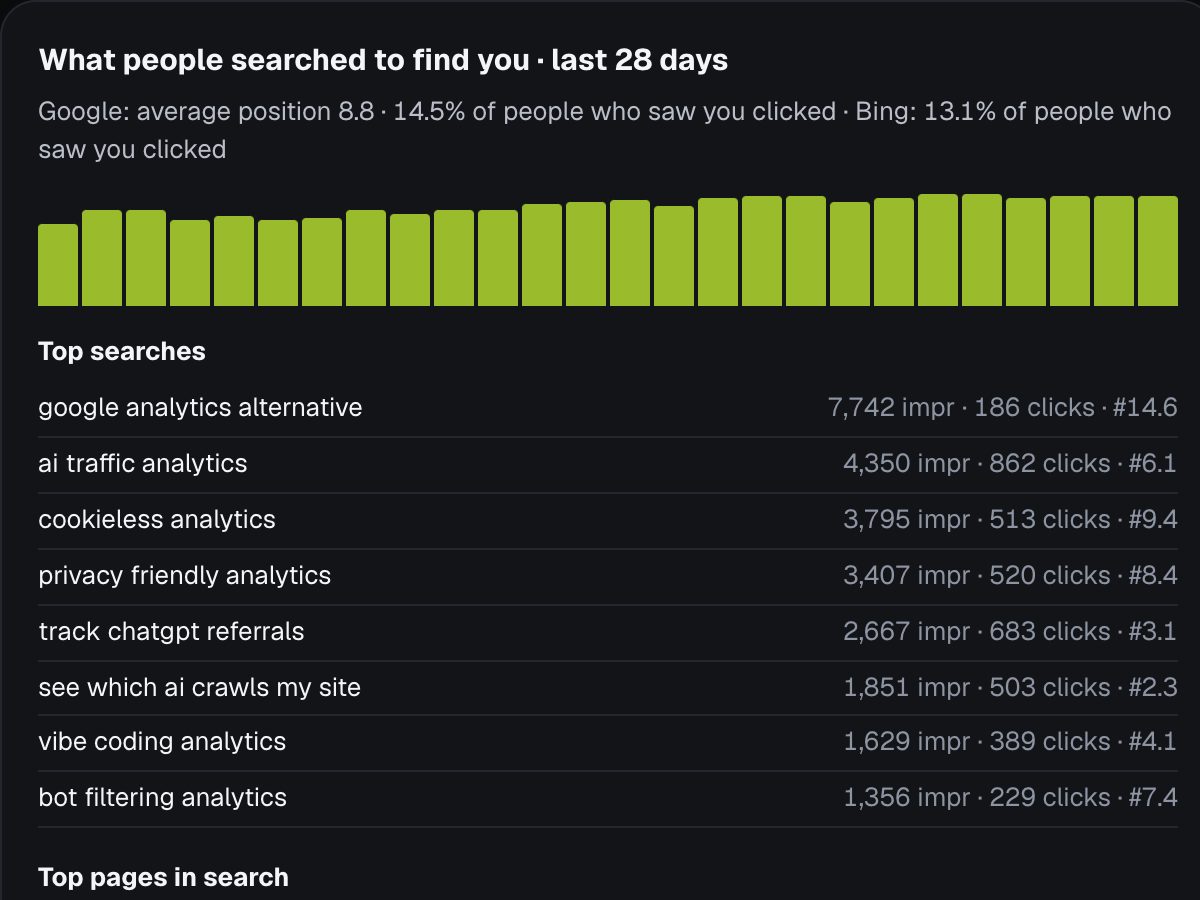
Google Search Console shows what people searched on Google before they found your site: the searches, how often you appeared, your position and how many clicked. It's free from Google, but it lives in a separate tool from your visitor numbers, so most people never connect the two. Seebly puts both side by side, along with Bing.
What Search Console tells you
- Searches (queries): the words people typed when your site appeared.
- Impressions: how many times you were shown in the results.
- Clicks and click rate: how many of those people chose you.
- Average position: roughly where you ranked. Position 1 to 10 is page one; 11 to 20 is page two, where very few people look.
Google's numbers are usually 2 to 3 days behind, and it hides very rare searches for privacy, so totals can be lower than the sum of the searches you see.
Why it matters more next to your visitors
On its own, Search Console stops at the click. Your analytics starts at the visit. Together they answer the questions that actually matter:
- Which searches bring people who stay, sign up or buy, and which bring people who leave at once?
- Which pages Google shows a lot but nobody clicks? Usually the title and description don't match what people searched.
- Which searches you're nearly winning, sitting just off page one, where a small improvement pays off most?
Don't forget Bing
Bing's share of searches is smaller, but it also powers the results inside other products, including some AI assistants' web searches. Bing Webmaster Tools has the same kind of data, free. Seebly shows Google and Bing in one place, so you don't need to check two dashboards.
How to connect it in Seebly
- Add your site to Seebly and open it.
- Under What people searched to find you, click Connect Google (and Connect Bing if you use it), then choose the account that owns your site in Search Console.
- Seebly finds your site automatically, brings in your recent search history and keeps it updated every night. It also submits your sitemap, so Google and Bing find new pages sooner.
Seebly only reads your search data and submits your sitemap. It never changes your Search Console settings, and you can disconnect at any time, which removes its access.
Don't have Search Console yet?
Add your site at search.google.com/search-console and verify you own it (the domain option, with one DNS record, covers every version of your site). For Bing, Bing Webmaster Tools can import your sites straight from Google. Data starts appearing within a few days.
Last updated 1 November 2026. More guides: Google Analytics alternatives · Do you need a cookie banner for analytics? · What is a good bounce rate? · Moving off Google Analytics · All guides